
Top Benefits of Using CRM Software for Interior Designers
Managing an interior design business involves balancing creativity with client communication, project tracking, and marketing efforts. AtSidemark, we know how challenging it can be to keep every detail organized while growing your client base. Using a CRM for interior designers helps you handle leads, schedule appointments, track projects, and maintain smooth communication; all from one platform. With the right system, you can save hours on administrative tasks and focus more on designing spaces that delight your clients.
Whether you are managing multiple projects or nurturing long-term client relationships, a dedicated CRM provides a structured way to organize your business. In this article, we will explore the top benefits of using a design CRM, showing how our tools support your workflow, marketing, and sales processes so that your business operates efficiently while keeping clients engaged throughout every stage of their projects.
What Is CRM Software for Interior Designers?
CRM software for interior designers is a system that manages client information, marketing, and sales in one place. It allows you to store leads, monitor communication, and track project progress without juggling multiple tools. With a design CRM, you can record client preferences, track project stages, and maintain an organized database that grows with your business.
According to widely cited CRM research associated with Salesforce, companies that effectively use CRM systems can achieve around a 34% increase in sales productivity and significant improvements in customer retention, underscoring how structured client management can directly impact business outcomes.
Definition of an Interior Design CRM
An interior design CRM stores client data, communication history, and project details in a centralized platform.This system organizes your workflow by keeping all relevant client information in one location.
From lead tracking and automated reminders to email campaigns and invoice management, you can manage the full project lifecycle without switching between multiple software tools. A well-structured CRM also lets you segment clients based on project type, budget, or style preferences, which allows you to communicate more effectively and maintain consistent follow-ups.
How a Design CRM Differs from Generic CRM Systems
Design CRM is built specifically for the workflow of interior designers.Unlike generic CRMs, which primarily store contacts and basic communication logs, a CRM for interior designers combines project management, marketing, and sales tools in one platform. It includes portfolio integration to showcase completed work, booking calendars to schedule consultations, and automated reminders for client follow-ups or design approvals.
Using a design CRM helps you stay ahead of project deadlines, track every interaction, and manage multiple clients simultaneously, which generic systems are not equipped to handle. By centralizing these tools, you reduce the risk of miscommunication and maintain a professional image with every client.
Benefit 1: Centralized Client and Lead Management
Managing multiple clients and projects can quickly become overwhelming without a clear system. A design CRM helps you organize your contacts and communications so nothing slips through the cracks.
Organized Contact Records
A design CRM stores all client information in one location.Every client’s details, from phone numbers and email addresses to project history and personal preferences, are kept together.
You won’t have to search through spreadsheets or scattered notes. This centralized approach makes it easy to track ongoing projects, reference past work, and quickly access any client information you need, saving time and reducing mistakes.
Unified Communication Tracking
All messages, calls, and emails are tracked in one system. You can follow conversations without losing context, whether you are replying to an email, texting a client, or returning a phone call.
Keeping all communication in a single place lets you respond promptly and maintain professional interactions throughout every stage of a project.
Benefit 2: Structured Sales Pipeline and Deal Tracking
Managing multiple design projects and client inquiries can get complicated quickly. Having a clear view of your sales pipeline helps you stay organized and keeps projects moving smoothly.
Clear Visibility into Each Project Stage
A CRM provides a visual overview of every project stage. You can see exactly where each client is in the process, whether they are just making an inquiry, reviewing a proposal, or signing a contract. This makes it easier to prioritize tasks and schedule project milestones.
By having all stages laid out visually, you can avoid overlaps, reduce delays, and handle multiple leads without losing track of any opportunities. This clarity also helps your team understand which projects need attention and which clients are ready to move forward.
Automated Follow-Up Tasks
CRM software can automatically assign follow-up reminders. You no longer have to remember to send emails or check in manually. The system can automatically prompt you to follow up at the right times, keeping leads engaged throughout the process.
This consistent communication increases the chances that potential clients move through each stage smoothly. By automating reminders, you can spend less time tracking tasks and more time focusing on design work and client interactions.
Benefit 3: Marketing Automation That Saves Time
Managing multiple clients and projects can quickly consume your day. Marketing automation allows you to handle communication and outreach without constant manual effort.
Email Campaign Automation
CRM automates outreach through scheduled email campaigns. You can set up emails to welcome new leads, provide updates on ongoing projects, or promote new services. The system delivers these messages automatically according to the schedule you create. This keeps your clients informed and maintains a professional presence without requiring you to send each message manually.
You can also segment your audience, sending targeted emails to specific groups, which helps maintain engagement with leads and current clients alike. Using this approach, you stay in touch consistently while freeing up time for the design work you enjoy most.
SMS and Appointment Reminders
Automated SMS reminders improve appointment attendance.Clients receive messages about upcoming consultations, deadlines, or important updates. You no longer have to manually contact each client to confirm meetings, and missed appointments are reduced. Automated reminders help your schedule run smoothly and allow you to focus on completing projects rather than managing logistics.
Example Workflow for Interior Designers
Lead submits a website inquiry.
CRM sends an instant welcome email.
Automated reminder is sent two days before consultation.
Project updates are sent automatically as tasks progress.
This workflow saves time while keeping clients informed. Using marketing automation in a CRM for interior designers lets you maintain communication, follow up on leads, and manage client expectations efficiently.
Benefit 4: Faster Client Onboarding and Contract Management
Starting a project with a new client can be time-consuming, especially when handling proposals, contracts, and payments manually. A design CRM simplifies these steps so you can focus more on creative work and less on administrative tasks.
Digital Proposals and E-Signatures
CRM software allows clients to review and sign proposals online. You no longer have to send multiple emails or print, scan, and fax documents. Clients can open a proposal, make decisions, and sign digitally within minutes.
Each signed document is stored securely in the system, so you can quickly reference agreements without searching through files. This process moves projects forward faster and creates a professional experience for clients from the very beginning.
Invoice Creation and Payment Tracking
Invoices are generated and monitored within the CRM. You can create detailed invoices for each project and send them directly to clients. The system tracks which invoices are paid, pending, or overdue, allowing you to follow up efficiently.
Automated reminders can be sent without additional effort, and having all payment information in one place keeps your workflow smooth. This reduces delays and helps maintain steady cash flow across projects.
Benefit 5: Improved Online Reputation and Client Retention
Building a strong reputation and keeping clients engaged over time can be challenging while managing multiple projects. A design CRM helps you maintain communication with clients consistently and professionally, even after a project ends.
Automated Review Requests
CRM can automatically request client reviews after project completion. As soon as a project wraps up, your system can send clients a prompt to share their feedback online. This process encourages honest reviews without you having to follow up manually.
Positive reviews appear on your website, social profiles, and directories, creating trust with potential clients and demonstrating the quality of your work. Automating this step saves time while keeping your online reputation active and visible to prospects.
Long-Term Client Nurturing Campaigns
Designers can maintain contact with past clients through automated campaigns.Your CRM allows you to send emails, updates, or newsletters to clients over months or years, keeping your business in their thoughts.
This type of ongoing communication encourages repeat projects, referrals, and loyalty without demanding extra effort on your part. By staying connected, you create stronger relationships, turning one-time clients into long-term supporters who recommend your services.
Benefit 6: Integrated Website and Lead Capture Tools
Having a single platform that combines website management and lead capture saves time and keeps your workflow organized. You can present your work professionally while connecting with potential clients immediately.
Website and Funnel Builders
CRM software often includes tools to build websites and sales funnels.With these tools, you can create a portfolio that reflects your style and past projects. A well-structured funnel guides visitors through your services, helping them move from inquiry to booking without confusion.
You don’t need separate systems for marketing or project intake, which simplifies your day-to-day work. Each page and funnel can be customized to match your brand, showing potential clients exactly what you offer and how you work. This gives you a professional presence online while keeping all leads and interactions connected to your CRM.
Forms, Surveys, and Booking Calendars
Forms and booking calendars collect client information and schedule appointments. You can gather details from prospects through customized forms or surveys, like design preferences, project timelines, or budget estimates.
Booking calendars let clients set appointments directly, reducing back-and-forth emails and missed opportunities. All the data flows automatically into your CRM, so you can track leads, follow up with potential clients, and organize project timelines in one place.
Benefit 7: Data-Driven Business Decisions
Making choices based on clear information helps your business grow steadily. A design CRM provides the tools to track performance and measure results so you can focus on strategies that work.
Reporting and Revenue Tracking
CRM software generates reports on sales, revenue, and project performance.With reporting features, you can see which services bring in the most revenue and which projects require more attention. These insights give you a clear view of your business trends, helping you balance resources across different tasks.
Instead of relying on memory or scattered notes, all your financial and project data is stored in one place, letting you see patterns over time. You can monitor monthly income, compare projects, and review client spending habits, which helps plan for future growth.
Conversion Metrics for Growth
Analytics measure lead-to-client conversion rates.Tracking conversions allows you to follow how many inquiries turn into active projects. You can identify which marketing activities attract the most clients and where follow-up might need improvement.
By monitoring these metrics, you can refine your communication, adjust scheduling, and follow up with leads more effectively. Over time, this data helps your business gain new clients consistently while maintaining strong relationships with existing ones.
Why Choose Sidemark as Your Interior Design CRM
Running an interior design business means juggling multiple tasks at once. You need a system that organizes client communication, project tracking, and marketing in a single place so you can focus on your creative work.
All-in-One Platform Tailored for Designers
Sidemark, based inAddison, Texas, combines CRM, marketing, and sales tools in one platform. You can manage every aspect of your business from a single dashboard. From tracking leads to organizing client conversations and following up on projects, we keep your workflow simple. It is built specifically for interior designers, so all the tools you need match the way you work, rather than forcing your process into a generic system.
Features That Support Marketing and Sales
Email and SMS marketing
Social media planning
Sales pipeline tracking
Website and funnel builders
Invoicing and e-signatures
These tools reduce the need to use multiple software systems, saving time and keeping everything in one place.
Support, Courses, and Community
We provide educational resources, weekly coaching, and a virtual community. You can access marketing courses designed for interior designers, join weekly virtual sessions, and connect with peers in a community focused on design businesses. This support helps you feel confident using the platform and developing your marketing and sales skills while managing projects.
Mobile Access and Real-Time Updates
Sidemark is accessible on mobile devices with live updates. You can track leads, reply to client messages, and monitor project progress from anywhere. The mobile app keeps your workflow smooth even when you’re away from your desk.
Plans and Pricing Overview
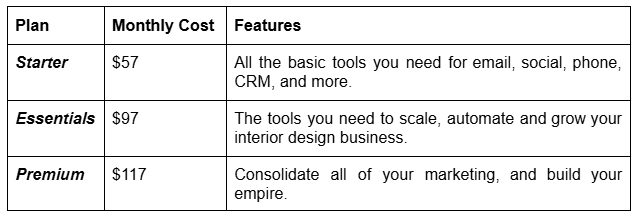
All plans include 24/7 support and access to the virtual community, giving you help whenever you need it.
Streamline Your Interior Design Business with Sidemark
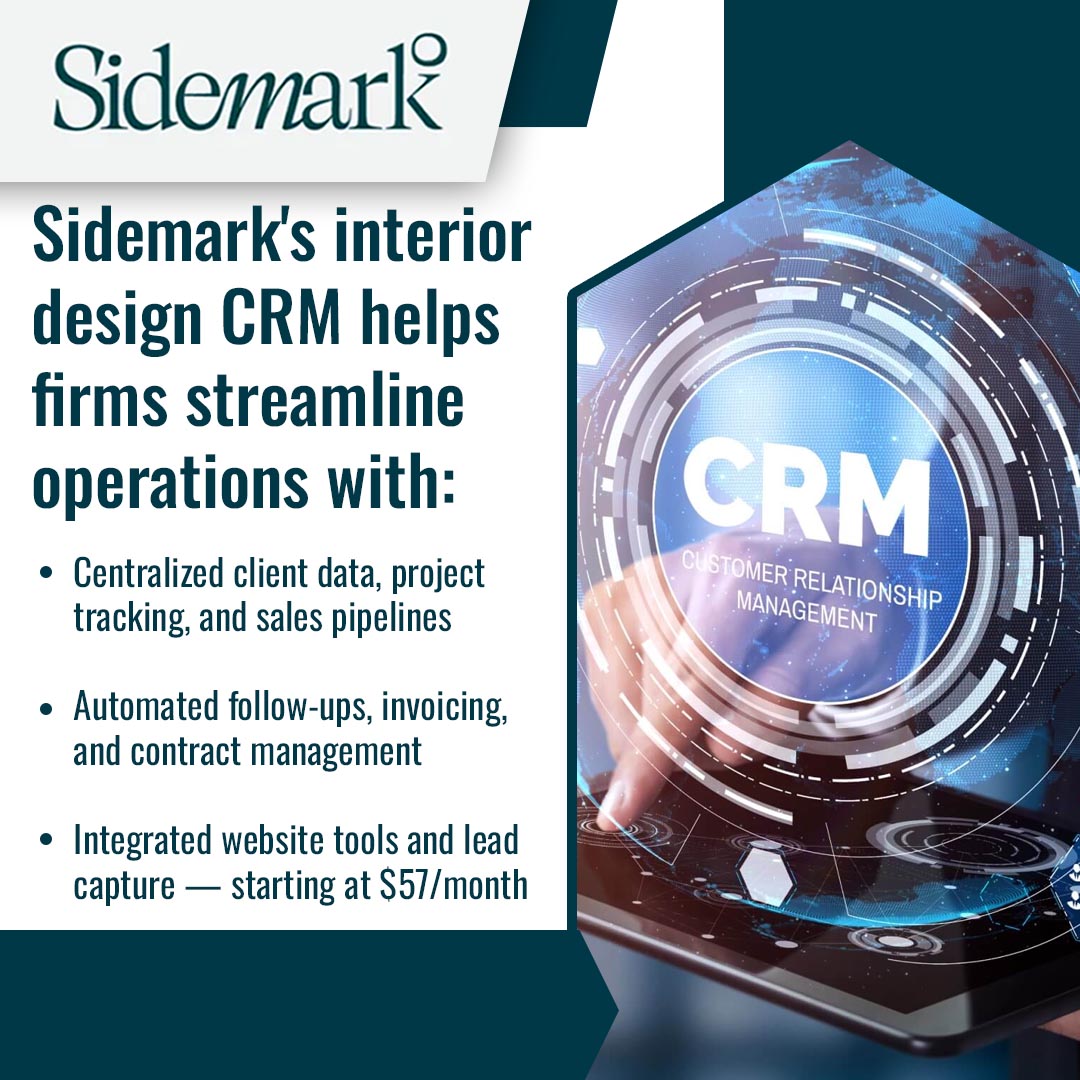
Get started with an interior design CRM and simplify your workflow today. Sidemark combines client management, project tracking, and marketing tools in one platform built for interior designers. Reach out now to see how we can fit your business needs. Call us at (214) 984-3383 or [email protected] to schedule a demo or start your free trial.